
Fewer Mistakes, Less Busywork:
What's New in ToolWatch for October 2026
This month's ToolWatch update is about two things: billing you can predict and inventory counts you can trust.
Nobody gets into construction because they love paperwork. You want your tools where they belong, your equipment running, and your crew working instead of chasing down records. This month's ToolWatch updates are about exactly that: catching small mistakes before they turn into big headaches, and cutting out the busywork that eats up your day.
Here's what's new.
Catch Counting Mistakes Before They Cost You
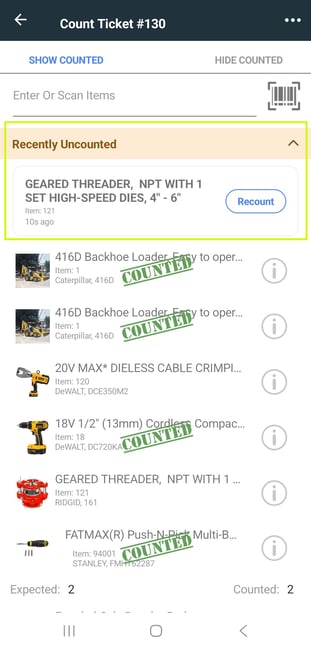
If you've ever counted a tool room with hundreds of tools, you know how easy it is to tap the wrong thing. One extra tap on a tool you already counted, and it quietly flips back to uncounted. The old notification flashed by so fast most people never saw it, so the mistake didn't show up until the numbers didn't add up.
This one came straight from a customer counting more than 600 tools, and we heard them loud and clear.
Now, when a tool gets uncounted, an orange banner shows up and stays put until you deal with it. Tap the banner to see exactly which tools were uncounted and when, then tap Recount to put any of them back. It works on both Count and Verify tickets in the ToolWatch mobile app.
The result: cleaner counts, fewer surprises, and no more walking the yard a second time to figure out what went missing.
Service Your Tools Based on How Hard They Work
A generator that runs ten hours a day doesn't wear out on the same schedule as one that sits in the trailer most of the month. Servicing by the calendar means you're either doing maintenance too early and wasting time, or too late and risking a breakdown on the job.
Now you can set service plans for tool items to repeat by hours. Pick By Hours when you set up the service plan, enter the hour it should start at and how often it should repeat, and ToolWatch creates the work order when the tool hits that mark. You can set it up right from the item or from the Item Browser.
There's also a new By Hours column on the Service Schedule list, so you can see at a glance which plans run on hours.
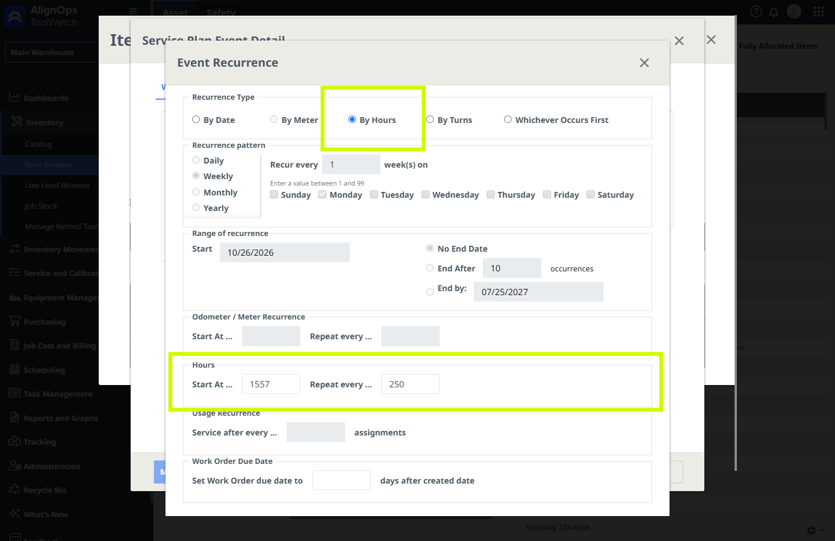
Good to know: 'By Hours' works for tool items. It isn't available for quantity or material items.
Upload Your Inventory in One Shot
If you bring in a lot of inventory at once, uploading files one at a time gets old fast. Now you can select several inventory files in the Data Loader and upload them together. Choose Add Inventory, then click Add Inventory Files.
ToolWatch checks every file before it uploads. If one is empty or missing a required column, you'll get a message telling you which file didn't make it, and the rest still go through. No starting over because of one bad file. We also sped up adding inventory for companies with large catalogs.
Tip: Keep your columns in the same order across all the files you upload together.
Fixes You Asked For
A lot of this month's work came from you telling us what wasn't working. Here's what we fixed:
- Transfers pull from the right place. When you scan or enter a quantity or material item on a transfer, it now uses the From location on the transfer, even if that location doesn't have an inventory record for the item yet.
- Editing descriptions doesn't wipe your other fields. Changing a model's Generic Description no longer clears out the Manufacturer Description and Features.
- Assigned To sticks on service plans. It saves the way it should, and you can clear it if nobody needs to be assigned.
- Weekly service schedules make sense. Instead of an error when you uncheck days, you'll get a clear reminder to pick at least one day.
- Easier quantity edits with Block Negative Inventory. If you have Block Negative Inventory turned on, you can now clear and retype quantities on transfer tickets.
Keep the feedback coming. It's how these fixes make the list.
Want the Full Details?
Questions? Reach out to your Customer Success team or our support team. We're always happy to help.