
Skip to content
Built for Your Operations

Excavating and Grading Contractors

Now, there's a better way to get the job done

AlignOps gives contractors real-time visibility into hauling, load cycles, and material movement—so earthwork stays on schedule, always.

calendar-clock

Less Idle Time

See when equipment is sitting around doing nothing, so you can step in, fix the issue, and stop paying for machines that aren’t actually working.
magnifying-glass-chart

Jobsite Visibility

When you can see what equipment is working, where it’s working, and for how long, it’s easier to plan the day, keep crews aligned, and avoid surprises.
truck-bolt

Extend Equipment Life

Tracking real run hours helps maintenance happen at the right time, which means fewer breakdowns, less downtime, and longer equipment life.
construction-workers-on-site

AlignOps is Trusted By Excavating and Grading Contractors

FleetWatcher Paving & Materials Management

FleetWatcher uses wireless technology to give excavating and grading contractors a clear view into their hauling and logistics. Thanks to Load Cycle Analysis, you can instantly pinpoint and fix any material or delivery delays in real time.

analytics

Set KPI Benchmarks

Monitor crucial productivity metrics in real-time. Track key performance indicators (KPIs) like start times, cycle times, and cost per ton. This gives you the tools you need to challenge yourself to get better and see operational errors across your logistics.
calendars

Dispatching

Easily manage and monitor material deliveries. Quickly schedule, communicate, and monitor the delivery of materials like large conduit orders or prefabricated components to your various job sites.
truck-bolt

Quick Truck Pay

Accurately manage third-party hauling costs. Edit, approve, and pay driver timecards without needing manual input from drivers. This is essential for accurately managing and paying third-party haulers delivering materials to your sites.
laptop-mobile

Virtual Shift Tickets

Say goodbye to manual documentation for haulers. Eliminate hand-written, manual shift tickets used to pay your third-party companies and truckers, simplifying accounting and reducing errors.
file-invoice

E-Ticketing Solution

Provide instant digital access to delivery receipts. DOT, customers, and haulers can instantly view scale tickets on their mobile devices. This is useful for instantly verifying the quantity of materials received at the job site.
laptop-binary

Integrations

Consolidate your tracking into one system. You no longer need multiple apps to track your fleet. Seamlessly integrate with OEM software, camera systems, and ERPs like Viewpoint and CRH solutions.

BusyBusy Field Management

BusyBusy Field Management delivers quick shift insights, replacing paper time cards and manual tracking. Flexible time tracking and GPS-based geofences allow you to effortlessly verify crews are on the job and on the clock.

file-chart-line

Daily Reports

Generate detailed site summaries in seconds. Quickly produce reports showing who was onsite, project progress, essential photos, and even the weather. This eliminates guesswork and manual documentation.
images

Jobsite Photos and Video

Organize and safety store visual proof of work. Submit, organize, and store all jobsite photos and videos—perfect for documenting pre-wire checks, final installations, and change orders—all in one secure place.
calendar-alt

Scheduling

Effortlessly manage your crew assignments. Create daily or recurring schedules for individuals or entire crews, set notifications, and manage shift drafts easily to ensure optimal project staffing.
files

Documents

Give your crew instant access to critical specs. Upload important digital files like permits, building codes, and site plans so your team can access the necessary documentation directly in the field.
messages-question

Company Messaging

Communicate instantly and efficiently. Send messages to individuals or groups right within the app, keeping essential communication focused and organized.
dollar-square

Payroll

Dramatically speed up payroll processing. Quickly scan for errors and make adjustments, allowing you to get payroll done fast instead of spending hours gathering paper time cards.
shield

Safety

Manage jobsite safety and compliance. Use the app to report incidents, submit OSHA forms, complete inspections, JSAs (Job Safety Analyses), and trainings, integrating safety directly into daily workflow.
hands-holding-dollar

Budgets & Progress Tracking

Monitor project profitability in real time. Set Labor, Equipment, and Progress budgets for your projects to track performance and stay ahead of potential cost overruns.

SafetyReports Risk Management

SafetyReports helps excavating and grading contractors manage risk by putting real-time safety data in their hands. Your crews can now easily identify hazards, track incidents, and automate compliance with simplified digital checklists.

file-magnifying-glass

Inspections

Streamline mandatory compliance and reduce risk exposure. Use simplified OSHA checklists (including Construction 1926 ) on mobile to easily perform and document safety inspections and compliance checks.
clipboard-list-check

Job Safety Analysis (JSA)

Identify and control excavating and grading hazards. Pinpoint potential job site and location hazards—especially for temporary wiring or lockout/tagout procedures—and implement controls to minimize risk before work begins.
brake-warning

Incidents

Rapidly record and investigate every incident. Document incidents and accidents with built-in injury and illness tracking. The system can auto-generate OSHA logs (like 300, 300A, and 301) to keep your documentation impeccable.
user-magnifying-glass

Observations

Empower your field team to be proactive risk managers. Enable your crews to quickly and easily record safety observations from their mobile devices, helping you catch minor issues before they become major incidents.
mobile-iphone

Scan

Use your mobile device to verify safety equipment. Easily scan and inspect safety equipment—like harnesses, ladders, or portable grounding gear—to ensure it's certified and compliant before use.
toolbox

Training

Simplify, document, and track all your essential safety training. Easily manage records for toolbox talks and required safety certifications, ensuring every worker is qualified and trained for the task at hand.
file-text

Forms

Go completely paperless with all your safety documentation. Convert bulky paper safety forms (permits, sign-offs, etc.) into digital forms accessible directly on any mobile device.

ToolWatch Asset Management

ToolWatch Asset Management helps excavating and grading contractors move beyond clunky tracking systems to increase efficiency by providing real-time, accurate data on every tool and piece of equipment you own.

memo-circle-check

Real-Time Inventory Catalog

Track essential details for all your tools, meters, and materials. Keep tabs on item quantities, assignment, status, and more. This gives you the accurate data you need to streamline your operations.
mobile-iphone

Mobile Field Requests

Keep your team working, not waiting on equipment. Crews can request specific tools or materials right from their phone, saving valuable time and keeping those urgent wiring projects running smoothly.
file-check

Pick Tickets and Transfers

Streamline tool logistics between sites or vans. Easily create pick tickets to ensure organized transfers and accurate billing. This helps you avoid project delays by making sure the right gear is where it needs to be.
laptop-arrow-down

Wireless Tracking

Protect your high-value equipment and instantly verify location. Use GPS trackers and BLE scans to verify asset locations and eliminate manual checks , helping you avoid tool loss and unnecessary project delays.
laptop-arrow-down

Purchasing and Receiving

Avoid material shortages on the job. The system helps you quickly populate purchase orders when your specialized material or tool stock levels drop, ensuring you have the supplies required for every installation.
file-invoice-dollar

Job Cost and Billing

Ensure precise project cost allocation. Accurately bill tool usage with features like rate sheets, custom cycles, and fixed rates. This allows you to recoup project operating expenses and ensures precise cost allocation.
calendar-alt

Service Requests

Prevent meter and diagnostic equipment breakdowns. Create service schedules, work orders, and view service history to keep your essential equipment in top condition and prevent unexpected failures.

Northeast Paving

On both projects, we were able to cut down on trucks while increasing our tons per shift. The paving and plant foreman were always checking to see what was what and where all the trucks were so we could pave at 35 FPM and keep the plant running at 400 TPH throughout the night. Both projects were a huge success in part because we had this great tool in our back pocket that we could use in live-action.

E.R. Snell

We were able to sync up job master information into project creation and updates within FleetWatcher with the help of the customization team. They have been very accommodating with some of our more specialized requirements. The Define Export module is user friendly and has enabled us to arrange the data for streamlined processing into Viewpoint.

Huey P Stockstill, LLC

Before FleetWatcher, we weren’t being efficient with trucks, but we really couldn’t say with confidence where the inefficiency was. Were we taking too long to load at the plant or too long at a certain job?... We didn’t have enough trucks for production, and we were having difficulty tracking our trucking cost. Also, we couldn’t calculate our productivity, and we were having difficulty estimating the right number of trucks for a job

Partnered With Associations Shaping the Future of Construction

Explore Industry Related Blogs & Resources

alignops named top construction firm

AlignOps Named a Top Construction Technology Firm in 2025

AlignOps ranks as a top construction tech firm in 2025, offering comprehensive tools for construction operations

Read More
alignops construction operations management platform

The Evolution of AlignOps: A Unified Platform Built for Construction

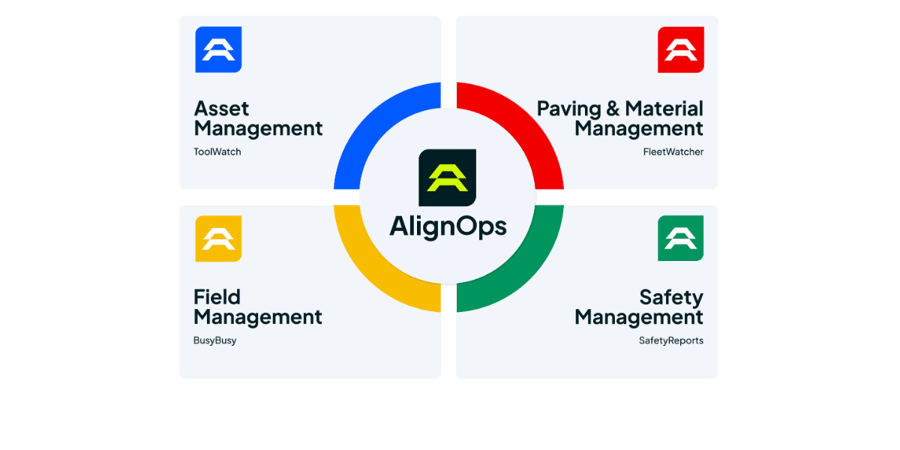
Discover the evolution of AlignOps, a unified platform combining ToolWatch, SafetyReports, BusyBusy, and FleetWatcher to streamline construction operations for enhanced productivity and safety.

Read More
architect and contractor looking at building blueprint

How to Support Spanish-Speaking Construction Crews

Supporting Spanish-speaking construction crews boosts safety, productivity, and morale. Discover how AlignOps addresses language gaps with innovative, multilingual tools.

Read More
construction operations metrics in 2025

The State of Construction Operations in 2025

Discover the top construction trends and challenges for 2025 and learn how to overcome these obstacles to position your business for success.

Read More

Take Control of Your Operations Today

AlignOps delivers the real-time data you need to optimize your field, fleet, assets, and risk management—guaranteeing proven ROI on every job.
AlignOps Platform

FAQ

FleetWatcher helps your excavation projects stay on schedule and avoid costly delays by giving you:

  • Real-time visibility into equipment locations and job progress, so you always know what’s happening on-site.
  • Cycle time tracking, so you can spot inefficiencies and adjust on the fly.
  • Automated reports that highlight potential slowdowns before they become major issues.
  • Instant alerts for equipment delays, breakdowns, or excessive idle time.

With FleetWatcher, you’re not waiting until the end of the day to find out there’s a problem—you get the data you need when you need it, so you can make quick decisions and keep your project moving forward.

FleetWatcher helps your excavation crew track and reduce unnecessary idle time by:

  • Providing real-time fuel and idle reports, so you can see exactly where waste is happening.
  • Sending alerts when equipment is idling too long, so you can make quick adjustments.
  • Helping operators develop better fuel-saving habits with clear data insights.

Less idle time means lower fuel costs, fewer emissions, and a more efficient job site—without making big operational changes.

FleetWatcher bridges the gap between the field and the office by providing:

  • Real-time job site data, so office teams aren’t relying on outdated info or waiting for phone calls.
  • Automated reporting, meaning no more handwritten notes or lost spreadsheets.
  • Instant alerts for delays, breakdowns, or equipment issues, so problems get addressed fast.
  • Mobile access, so field teams can check in and update progress without stopping work.

No more guesswork, no more “I’ll check and get back to you,” just clear, real-time visibility that keeps the whole team in sync—without the endless back-and-forth