
What's New in ToolWatch: September 2026
This month's ToolWatch update is about two things: billing you can predict and inventory counts you can trust.
We added a flat rate billing option so the same piece of equipment bills the same amount every cycle. We also added a setting that stops inventory from going negative the moment a bad transaction happens, not weeks later when someone's trying to reconcile the numbers. On top of that, there's a handful of time savers your warehouse and field crews will notice right away. Here's the rundown.
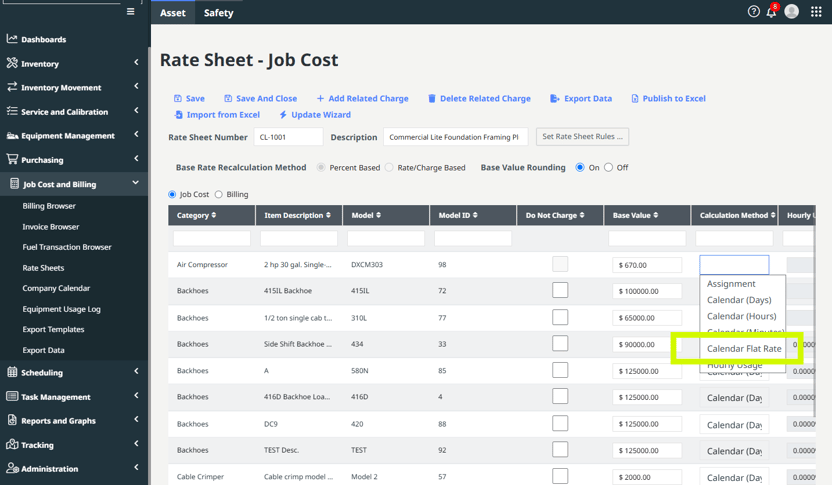
Calendar Flat Rate: same equipment, same job, same bill
Here's a problem you may have run into. With standard Calendar rates, ToolWatch figures an hourly rate behind the scenes. That means the same generator on the same job could bill a little differently in February than it does in March, just because one billing cycle had more hours in it than the other. Nothing changed on the jobsite, but the number did.
Calendar Flat Rate fixes that. You set a fixed Daily, Weekly, and Monthly dollar amount. The Migration Points you already use still bump an item up to the next rate once it crosses the threshold. Once it's there, it bills that flat rate. Period. It doesn't matter how many hours or days are in the cycle.
The guardrails you count on today still work exactly the same way on Flat Rate items: Max Item Charge, Max Job Charge, Max Period Charge, and Loss Charge.
To be clear, this doesn't replace standard Calendar rates. It's another option, and it's a good fit if:
- You want to see the same number on every invoice so there are no surprises
- You're working under a contract with a hard billing cap
- You're tired of explaining to a PM why the same tool cost more this month
Calendar Flat Rate is available on Tools & Equipment Rate Sheets for Pro and Enterprise customers using Job Cost and Billing.
Block Negative Inventory: catch the problem when it happens
You can't have negative 4 boxes of drill bits on a shelf. But if a count is off and nobody catches it, your system can say you do. By the time someone spots it during reconciliation, nobody remembers what happened.
Block Negative Inventory is a new company-level setting that stops any transaction that would drop an item's count below zero. It works on both Pick Tickets and Transfers, in the cloud and on mobile.
Here's what happens when it kicks in:
- If the person has Inventory Adjustment permission, they're prompted right then and there to correct the count, and then they can keep going.
- If they don't have that permission, the transaction is blocked until someone corrects the quantity.
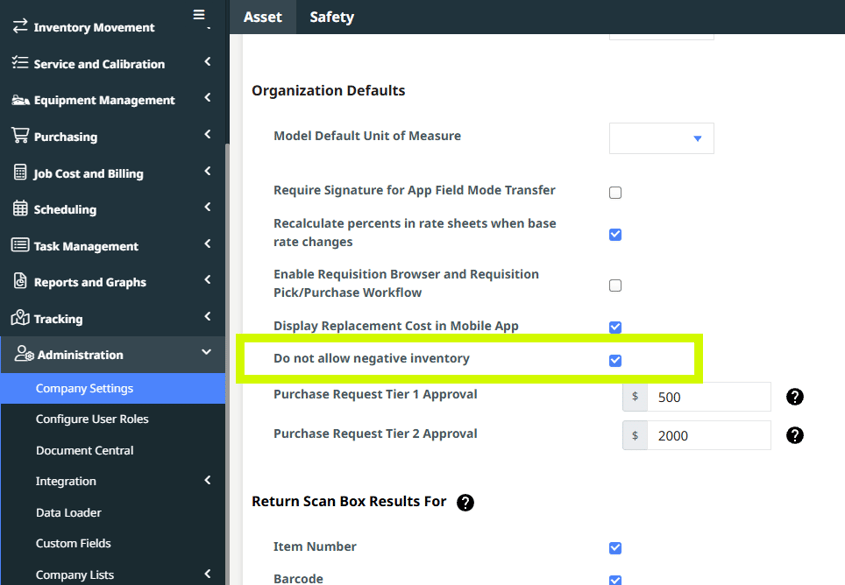
A few things worth knowing. It's opt-in if you're an existing customer, and it's on by default for new customers. Turning it on won't touch or reset anything that's already negative. It only changes what happens from that point forward, so you can switch it on without worrying about messing up your current numbers.
Smaller updates that save real time
Add one image to up to 20 catalog models at once
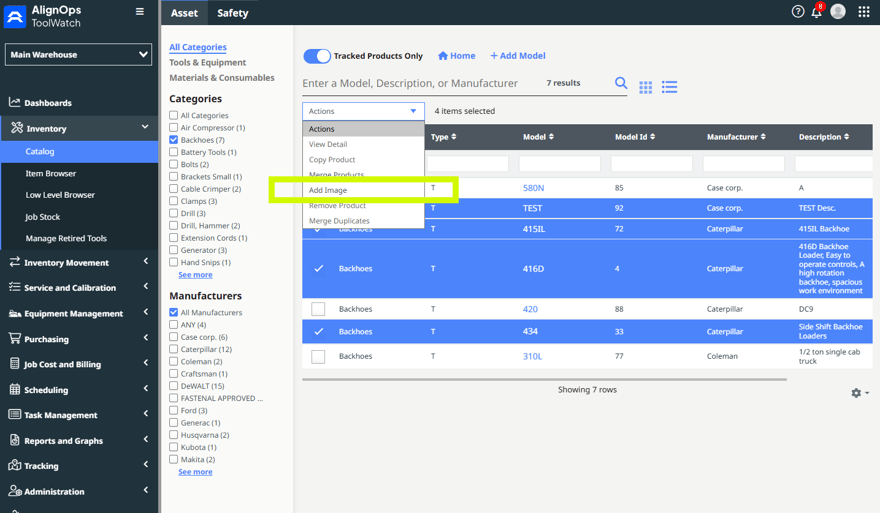
If you've ever updated catalog photos one model at a time, you'll like this one. Select up to 20 models in the Catalog (grid or table view), click Add Image, and upload once. The same image goes on all of them. You can use the file picker, drag and drop, or paste straight from your clipboard. Thumbnails update right away, no page reload. And if something doesn't go through, like a file in the wrong format, ToolWatch tells you exactly which models worked and which didn't, by name and ID. Nothing fails quietly.
Search on mobile request tickets
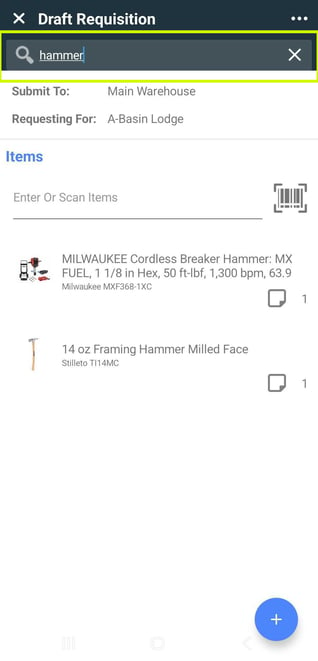
The item list on a mobile request ticket now has a search bar. Type what you're looking for instead of scrolling through the whole list.
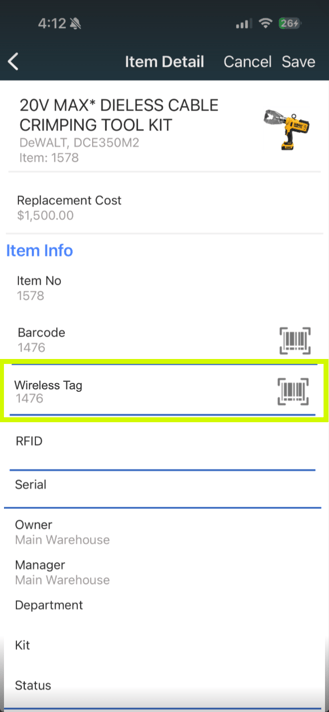
Assign wireless tags right from the item page
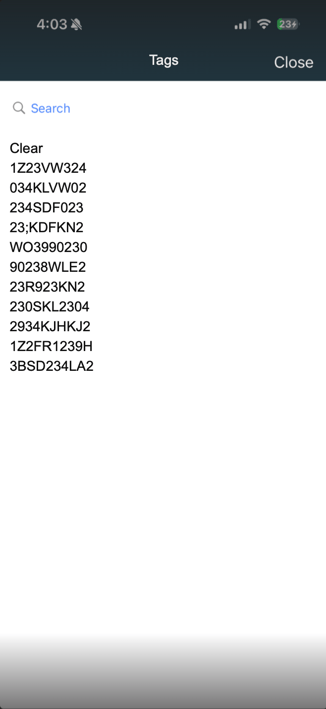
In Warehouse mode on mobile, the Wireless Tag field now sits on the item screen between Barcode and RFID. Tap the menu, then Edit Item, then the Wireless Tag field. From there you can scan the tag's QR code to fill in the MAC address automatically (works with INGICS tags), or pick it from the list. If that tag is already on another item, ToolWatch asks before moving it over. Need to remove a tag? Tap the field, tap Clear, and save.
This is Warehouse mode only, on purpose. Field mode is built for transfers, pick tickets, and check-ins, not editing item records.
Stop rate sheets from rounding
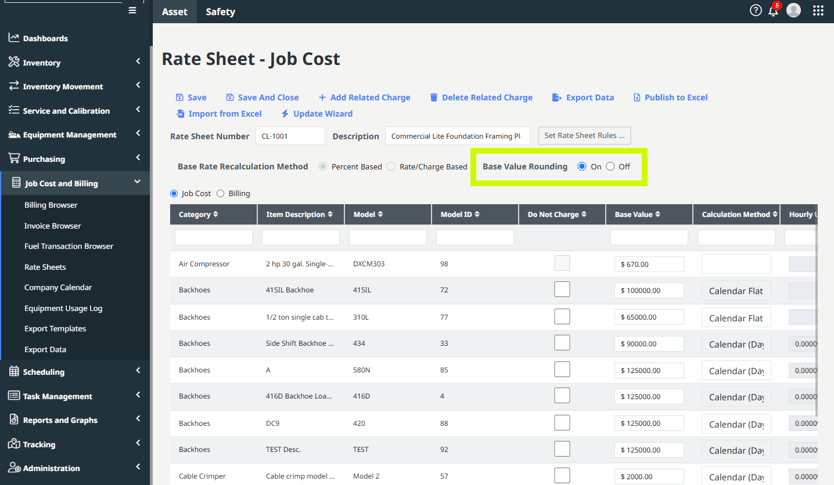
Today, rate sheet billing rounds to two decimal places. Charge 2% per day on an item worth $23.37 and the math comes out to $0.4674, which gets rounded to $0.47. A new setting on the rate sheet lets you keep the full number instead.
If you turn it on, ToolWatch recalculates every existing row on that rate sheet, not just new ones. The setting locks while a rate sheet has open calculations, so you can't flip it halfway through and end up with mismatched numbers. Flat rates someone typed in by hand, like a fixed $8.00 daily rate, stay exactly as entered either way.
Fixes and cleanup
We also knocked out a batch of issues that were getting in your way:
- Rate sheet lines with a base value of 0 now import correctly.
- Single sign-on no longer fails for companies whose login URL includes a question mark.
- Clicking Add Item from the Item Browser with all categories selected now opens your catalog instead of a blank page.
- Tool Summary and other tool reports no longer time out when item descriptions run longer than 100 characters.
- The cost code on a pick ticket now carries down to every line item.
- Barcodes and quantities on transfer printouts have room to breathe again, and barcodes no longer overlap on Avery #5162 labels.
- SMS opt-in checkmarks for GPS asset alerts now save.
- On newer Android phones, buttons in Transfers and Wireless Scan aren't hidden behind the phone's navigation bar anymore.
- The Department field now shows up when you export all fields from Item Browser.
- On mobile, going back after adding items to your cart in Requests no longer lands you on a blank screen.