We’ve rolled out new functionality in FleetWatcher by AlignOps designed to give users instant visibility into active project performance. The latest Today’s Projects view makes it easy to assess project status at a glance—so you can quickly determine whether work is on track or if adjustments are needed.
Filter and Focus on What Matters
With Today’s Projects, users can filter by project or project type to zero in on specific work. Each listed project displays key identifiers and performance metrics, including:
- Project name and type
- Number of pieces of equipment in use
- Total runtime hours
- Total miles
- Fuel usage
- Productive percentage
A simple thumbs-up / sideways / down visual indicator highlights whether each project is meeting, approaching, or falling short of productivity goals.
Drill Down for More Detail
Want a deeper look? Users can:
- Click the Map button to view the project’s live location
- Use the Maintenance button to check for upcoming or overdue equipment maintenance
- Select All Data to explore a more detailed breakdown of project and equipment productivity
You can also drill down further into specific projects or assets for more granular insights.
By default, non-standard projects (like unassigned or unauthorized stops) are excluded—but users can easily include them as needed.
Designed for Real-Time Awareness
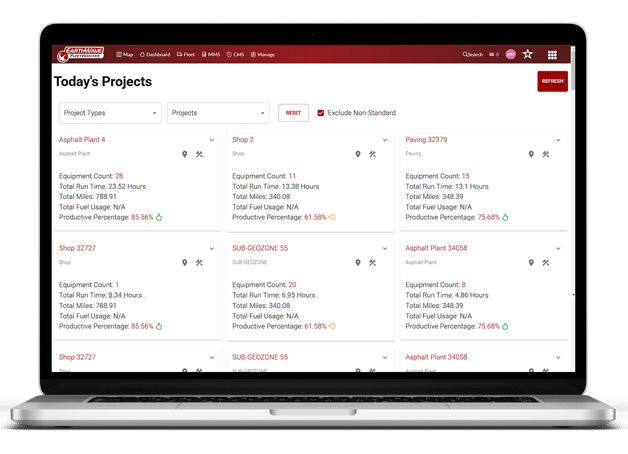
The Today’s Projects dashboard refreshes automatically at set intervals to ensure data stays current, but users can also manually refresh the page to instantly reflect changes.
“This new functionality gives users a clear view of whether their projects are on track—or if adjustments are needed,” said Evan Triggs, Vice President of FleetWatcher by AlignOps. “It’s another example of how consolidating data into a single source helps tame information overload. You get high-level visibility with the option to drill down into project and equipment productivity.”
Ready to See It in Action?
Want to see how this new feature can improve your project oversight? Schedule a demo with us today.