
BusyBusy Work Orders for Construction Task Management
A project task comes up during a jobsite conversation. An operator reports a problem with a piece of equipment. A repair request reaches the shop by phone.
Someone knows the work needs to get done. But as the day moves on, it can be harder to answer who owns it, whether they’ve started, and what happened when they finished.
BusyBusy Work Orders gives construction teams a simple way to assign, track, and document work tied to a project or piece of equipment. It puts the request, the person responsible, and the completed job in one place.
Know What Needs Attention with BusyBusy Work Orders
Calls, texts, and paper notes can get a request to the right person. They don’t always give the rest of the team a clear view of what’s still open.
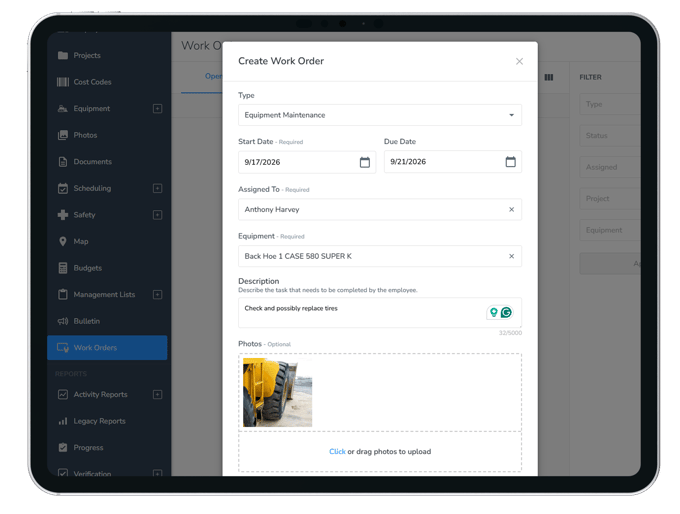
A team member with permission to manage work orders can create a project task, equipment repair, or equipment maintenance job and assign it to an employee. The employee gets a notification and can access their assigned work order on the web or in the BusyBusy mobile app.
Each work order moves through three statuses: Not Started, In Progress, and Complete. Managers with the appropriate permission can check its status without having to ask for another update.
BusyBusy Work Orders includes:
- Project and equipment links: Keep each job connected to the project or piece of equipment it belongs to.
- Clear assignments: Give the work to the person responsible for doing it.
- Job details: Add a description, start date, optional due date, and photos.
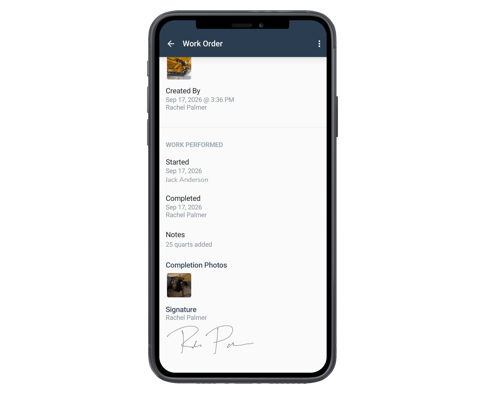
- Completion records: Document the finished work with notes, photos, and costs.
- Optional signatures: Collect an employee signature and an additional sign-off when those settings are enabled.
- Search and filters: Find work orders by BusyBusy ID or your own work order number, and filter by status, assignee, project, or equipment.
- Web export and print: Save a record outside BusyBusy when you need one.
How Construction Teams Can Use BusyBusy Work Orders
The work might happen on a jobsite or in the equipment yard. In either case, the team needs a way to get it assigned, see its progress, and confirm it’s done.
Here are three ways contractors can put Work Orders to use.
Keep project tasks from falling through the cracks
A foreman notices a task that needs to be completed before the next phase of work. They tell someone about it, but the crew gets pulled in different directions. Later, it’s unclear whether anyone finished the job.
A Project Task work order gives that request an owner. A team member with permission to manage work orders can tie it to the right project, describe what needs to happen, and assign it. The employee can start the task and add notes or photos when it’s complete.
The team can see the status of the work without having to reconstruct the original conversation.
Move equipment issues toward a repair
An equipment problem may be spotted in the field, reported to a manager, and then passed to the shop. Each handoff creates another chance for details to get lost.
With Work Orders, an authorized team member can create a repair job tied to the specific machine and assign it to the person handling the work. If the team also uses BusyBusy Equipment Inspections, someone reviewing a completed inspection can create a work order directly from a flagged issue. The equipment is already filled in, making it easier to move from finding the problem to assigning the fix.
The shop can see what was reported, and managers with the appropriate permission can see when the repair is in progress or complete.
Keep a record of what happened
When a job is done, “it’s fixed” may not be enough detail for the office, a supervisor, or a customer.
The employee can add completion notes and photos to the work order. Teams can also record itemized costs for parts and fees, plus labor entered manually as an item. If signature settings are enabled, the employee can sign the completed job. A supervisor, shop manager, or customer can provide an additional sign-off after reviewing a read-only summary of the job and its cost.
That gives the team a clear process:
- Create a work order tied to a project or piece of equipment.
- Assign it to the person doing the work.
- Track it from Not Started through Complete.
- Document the result in the same record.
Construction work doesn’t always arrive in a neat queue. BusyBusy Work Orders helps teams capture the next task, give it an owner, and know when it’s done.
Ready to see how BusyBusy Work Orders can help your team keep work moving? Schedule a demo today.